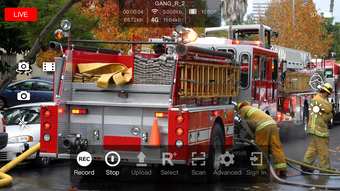

Download TVU Anywhere – live video, remote camera, smartphone video, mobile broadcasting, news reporting, event coverage
Overview
TVU Anywhere is a free Android application developed by TVUNetworks designed to transform smartphones and tablets into professional-grade video capture devices. The software enables users to record high-quality video and audio directly from their mobile devices, making it a valuable tool for remote content creation. Its primary purpose is to facilitate live video transmission from field locations, particularly beneficial for journalists, news crews, and event coverage teams who require reliable on-the-go broadcasting capabilities.
The application streamlines the setup process with guided instructions, ensuring users can begin recording quickly without extensive technical knowledge. It supports switching between front and rear-facing cameras, allowing flexibility in framing and perspective during live shoots. Users can record continuously, adapting to the duration required for interviews, press conferences, or live event coverage. The software is specifically tailored for professionals in media and broadcasting who need to deliver real-time video from remote or unpredictable environments.
TVU Anywhere integrates with the TVU Command Center, allowing studios to remotely adjust camera settings such as brightness, zoom, and framing. This feature enhances control and consistency in live broadcasts. The app is compatible with a range of Android devices and supports multiple video formats, promoting broad accessibility and interoperability across production workflows.
Key Features & Capabilities
- Smartphone as Video Camera: Turns Android smartphones and tablets into professional video capture tools, eliminating the need for bulky equipment.
- Live Video Transmission: Enables real-time video streaming from remote locations, ideal for breaking news and live event coverage.
- Camera Switching: Allows users to toggle between front and rear cameras during recording, supporting dynamic shooting angles.
- Remote Camera Control: Studio operators can adjust settings like brightness, zoom, and framing via the TVU Command Center, ensuring consistent output.
- Continuous Recording: Supports long-duration recordings, suitable for extended interviews or live broadcasts without interruption.
- Multi-Format Support: Compatible with various video formats, facilitating seamless integration into existing broadcast and editing pipelines.
These features empower field reporters to deliver studio-quality video without the logistical challenges of traditional broadcast gear. For example, a news crew covering a protest can use multiple devices to capture different angles, with a central studio adjusting camera settings in real time for optimal framing. Similarly, event organizers can broadcast live segments from different locations within a venue, all managed from a single command center.
User Interface, Workflow & Performance
TVU Anywhere features a streamlined user interface designed for intuitive operation in high-pressure environments. The onboarding process includes step-by-step guidance to set up the device for recording, minimizing the learning curve for new users. Navigation is straightforward, with primary controls—such as record, camera switch, and settings—placed within easy reach.
Workflow efficiency is enhanced by the app’s focus on rapid deployment. Once configured, users can begin recording with minimal delay, which is critical during time-sensitive news events. The interface prioritizes essential functions, reducing the risk of accidental misconfigurations during live transmission.
The developer did not specify resource usage details. Performance observations are based on general software behavior patterns. The application is designed to operate efficiently on Android devices, but actual performance may vary depending on hardware capabilities and network conditions. Stability during extended recording sessions is expected to be reliable, given its professional use case, though specific metrics were not provided.
Compatibility & System Requirements
TVU Anywhere is designed for Android devices, ensuring broad accessibility across a wide range of smartphones and tablets. The application supports various video formats, promoting compatibility with different broadcast and editing systems. However, exact system requirements were not listed.
Compatibility information was partially provided. The developer did not specify minimum Android versions, required RAM, or CPU specifications. Installation size and hardware requirements are also not available. Users should ensure their device meets the general standards for running video capture and streaming applications, particularly for stable live transmission.
Pros and Cons
Pros
- Free to download and use, reducing entry barriers for field reporters and small crews.
- Transforms everyday smartphones into professional video tools.
- Enables live video transmission from remote locations with minimal setup.
- Remote camera adjustments via TVU Command Center enhance broadcast control.
- Supports continuous recording and multiple video formats.
Cons
- Compatibility details such as minimum OS version and hardware requirements were not provided.
- Performance under low-bandwidth conditions is not specified.
- Limited to Android devices; no support for iOS or other platforms.
- Remote control functionality requires a separate TVU Command Center subscription.
- Resource usage during extended recording sessions was not disclosed.
FAQ Section
Is TVU Anywhere compatible with iOS devices?
TVU Anywhere is currently designed for Android devices. The developer did not provide information about iOS compatibility.
Is the app safe to download and use?
TVU Anywhere is a free application developed by TVUNetworks. As with any third-party app, users should download it from official sources to ensure security and authenticity.
Does TVU Anywhere require an internet connection?
Yes, live video transmission and remote camera control require a stable internet connection. The app is designed for use in environments where connectivity is available.
Can I use TVU Anywhere without a TVU Command Center?
While the app can record video independently, remote camera adjustments require access to the TVU Command Center. This feature is not available in standalone mode.
Is TVU Anywhere free to use?
Yes, TVU Anywhere is available at no cost. However, advanced features like remote control may require a subscription to the TVU Command Center service.
Final Thoughts + CTA
TVU Anywhere stands out as a practical and accessible solution for professionals in journalism, event coverage, and mobile broadcasting. Its ability to turn Android devices into reliable video sources, combined with remote studio control, offers a powerful toolset for on-the-go content creation. While system requirements and performance metrics are not detailed, the app’s focus on usability and live transmission aligns well with the needs of field reporters and media teams.
For journalists and production crews operating in dynamic environments, TVU Anywhere provides a cost-effective alternative to traditional broadcast gear. Its integration with the TVU Command Center enhances control and consistency, making it a compelling choice for live video workflows. Although platform limitations exist, the app delivers strong value for its intended audience.
Download TVU Anywhere now





.png)

